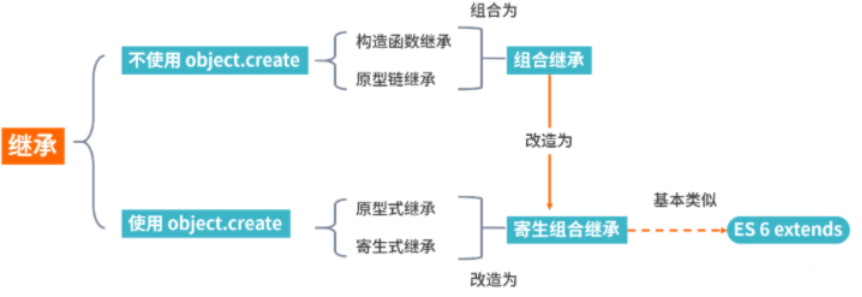
inheritance | 继承
继承的核心思想是建立一种层次结构,其中父类包含通用的特征和行为,而子类可以在这个基础上进行扩展或修改,以满足特定需求。这有助于代码的重用、可维护性和扩展性。
方式:
- 原型链继承
- 构造函数继承
- 组合继承
- 原型式继承
- 寄生式继承
- 寄生组合式继承
1. 原型链继承
    function Parent() {};
    function Child() {};
    Child.prototype = new Parent();  // 核心
- 优点:简单,易于实现
- 缺点:
- 引用类型的属性被所有实例共享
- 在创建 Child 的实例时,不能向 Parent 传参
2. 构造函数继承
    function Parent() {};
    function Child() {
        Parent.call(this);  // 核心
    };
- 优点:
- 避免了引用类型的属性被所有实例共享;
- 可以在 Child 中向 Parent 传参
- 缺点:
- 方法都在构造函数中定义,每次创建实例都会创建一遍方法
- 无法实现函数复用,每个子类都有父类实例函数的副本,影响性能
组合继承(方式1+2)
    function Parent() {};
    function Child() {
        Parent.call(this); // 方式 2 (Child实例后,只会访问这里的Parent里this创建的属性)
    };
    Child.prototype = new Parent();  // 方式 1(所以这里会出现Parent里this创建的多余的属性)
    Child.prototype.constructor = Child;
- 优点:融合原型链继承和构造函数的优点,是
JavaScript中最常用的继承模式 - 缺点:调用了两次父类构造函数,生成了两份实例,原型链上有冗余数据
继承(inheritance)是面向对象软件技术当中的一个概念。
如果一个类别B“继承自”另一个类别A,就把这个B称为“A的子类”,而把A称为“B的父类别”也可以称“A是B的超类”
javaScript 常见继承方式:
- 原型链继承
- 构造函数继承(借助 call)
- 组合继承
- 原型式继承
- 寄生式继承
- 寄生组合式继承
原型链继承
原型链继承是比较常见的继承方式之一,其中涉及的构造函数、原型和实例,三者之间存在着一定的关系,即每一个构造函数都有一个原型对象,原型对象又包含一个指向构造函数的指针,而实例则包含一个原型对象的指针
function Parent() {
    this.name = 'parent';
    this.play = [1, 2, 3];
}
function Child() {
    this.type = 'child';
}
Child.prototype = new Parent();
var s1 = new Child();
实际存在潜在问题
改变s1的play属性,会发现s2也跟着发生变化了,这是因为两个实例使用的是同一个原型对象,内存空间是共享的
var s2 = new Child();
s1.play.push(4);
console.log(s1.play, s2.play); // [1, 2, 3, 4] [1, 2, 3, 4]
构造函数继承
构造函数继承是指在子类的构造函数中调用父类的构造函数,通过 call 或 apply 改变 this 的指向,将父类的属性或方法添加到子类的 this 对象上
父类的引用属性不会被共享,优化了第一种继承方式的弊端,但是只能继承父类的实例属性和方法,不能继承原型上的属性或者方法
function Parent() {
    this.name = 'parent';
    this.play = [1, 2, 3];
}
Parent.prototype.getName = function () {
    return this.name;
}
function Child() {
    Parent.call(this);
    this.type = 'child';
}
var child = new Child();
console.log(child);  // 没问题
// 父类原型对象中一旦存在父类之前自己定义的方法,那么子类将无法继承这些方法
console.log(child.getName());  // 会报错
组合继承
前面两种继承方式,各有优缺点。组合继承则将前两种方式继承起来
function Parent(name = 'parent') {
    this.name = name;
    this.play = [1, 2, 3];
}
Parent.prototype.getName = function () {
    return this.name;
}
function Child(name = 'child') {
    // 第二次调用 Parent()
    Parent.call(this, name);
    this.type = 'child';
}
// 第一次调用 Parent()
Child.prototype = new Parent();
// 修正构造函数指向
Child.prototype.constructor = Child;
var child1 = new Child('child1');
var child2 = new Child('child2');

child1.play.push(4);
console.log(child1.play, child2.play); // [1, 2, 3, 4] [1, 2, 3]
console.log(child1.getName()); // 'child1'
console.log(child2.getName()); // 'child2'
方式一和方式二的问题都解决了,但是 Parent 执行了两次,造成了多构造一次的性能开销
原型式继承
借助 Object.create 方法实现普通对象的继承
var Parent = {
    name: 'parent',
    play: [1, 2, 3],
    getName: function () {
        return this.name;
    }
}

var child = Object.create(Parent);
child.name = 'child';
child.play.push(4);

var child2 = Object.create(Parent);
child2.play.push(5);

console.log(child.name); // 'child'
console.log(child.name === child.getName()); // true
console.log(child2.name); // 'parent'
console.log(child.play); // [1, 2, 3, 4, 5]
console.log(child2.play); // [1, 2, 3, 4, 5]
这种继承方式的缺点也很明显,因为 Object.create 方法实现的是浅拷贝,多个实例的引用类型属性指向相同的内存,存在篡改的可能
寄生式继承
寄生式继承在上面继承基础上进行优化,利用这个浅拷贝的能力再进行增强,添加一些方法
var Parent = {
    name: 'parent',
    play: [1, 2, 3],
    getName: function () {
        return this.name;
    }
}

function clone(original) {
    var clone = Object.create(original);
    clone.getPlay = function () {
        return this.play;
    }
    return clone;
}

var child = clone(Parent);
console.log(child.getName()); // 'parent'
console.log(child.getPlay()); // [1, 2, 3]
优缺点也很明显,跟上面的原型式继承一样
寄生组合式继承
寄生组合式继承,借助解决普通对象的继承问题的 Object.create 方法,在全面几种继承方式的优缺点基础上进行改造,这也是所有继承方式里面相对最优的继承方式
function clone(parent, child) {
    child.prototype = Object.create(parent.prototype);
    child.prototype.constructor = child;
}

function Parent(name = 'parent') {
    this.name = name;
    this.play = [1, 2, 3];
}
Parent.prototype.getName = function () {
    return this.name;
}
function Child(name = 'child') {
    Parent.call(this, name);
    this.type = 'child';
}
clone(Parent, Child);
Child.prototype.getType= function () {
    return this.type;
}
var child1 = new Child('child1');
var child2 = new Child('child2');
console.log(child1.getName()); // 'child1'
console.log(child1.getType()); // 'child'
console.log(child2.getName()); // 'child2'
console.log(child2.getType()); // 'child'
conclusion